
Project type
Conceptual product design
Role
Product Designer (End-to-End UX/UI & Research)
Tools
Figma, Adobe Illustrator, Miro, Google Forms, Microsoft Teams, Excel


Researching the challenge to form a deep understanding and empathy for potential users
Research was conducted using competitive analysis, survey questionaires, and literature review.
Reported they would feel more comforrtable using a nickname on a community app
"Reviews"
"A profile with a bio and reviews if applicable"
"Similar demographics to me."
Pet sitting
Manual labor
Car help
Groceries
Tools
Maybe borrow a tool, ingredient, or item of some sort
80% : Yes
20% : Maybe

Strengths: Community aspect, local groups
Weaknesses: User required to use name by default, account is attached to general facebook account. Meta retains user data
Strengths: Community aspect, local groups, dedicated for local groups
Weaknesses: Can be gossipy, not always a positive environment
I synthesized my research into 4 defined problems regarding potential users, and 4 proposed solutions.
People often hesitate when asking for help due to fear of embarrassment and uncertainty
.svg)
Use prebuilt templates so users can ask for help without having to draft a request from scratch

People feel uneasy trusting a stranger online to successfully complete a task for them
Implement a review/rating system so volunteers can be verified as “trusted”
Existing tools such as Nextdoor and Buy Nothing require user data, increasing safety concerns
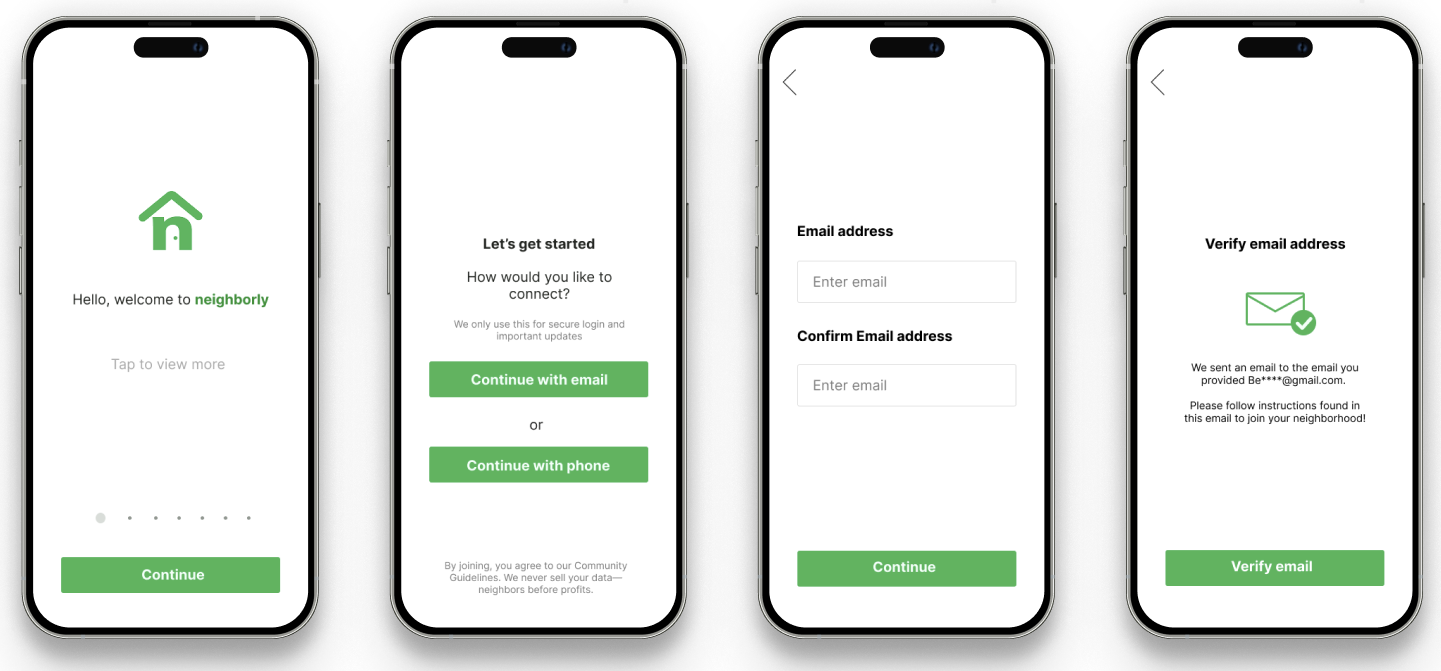
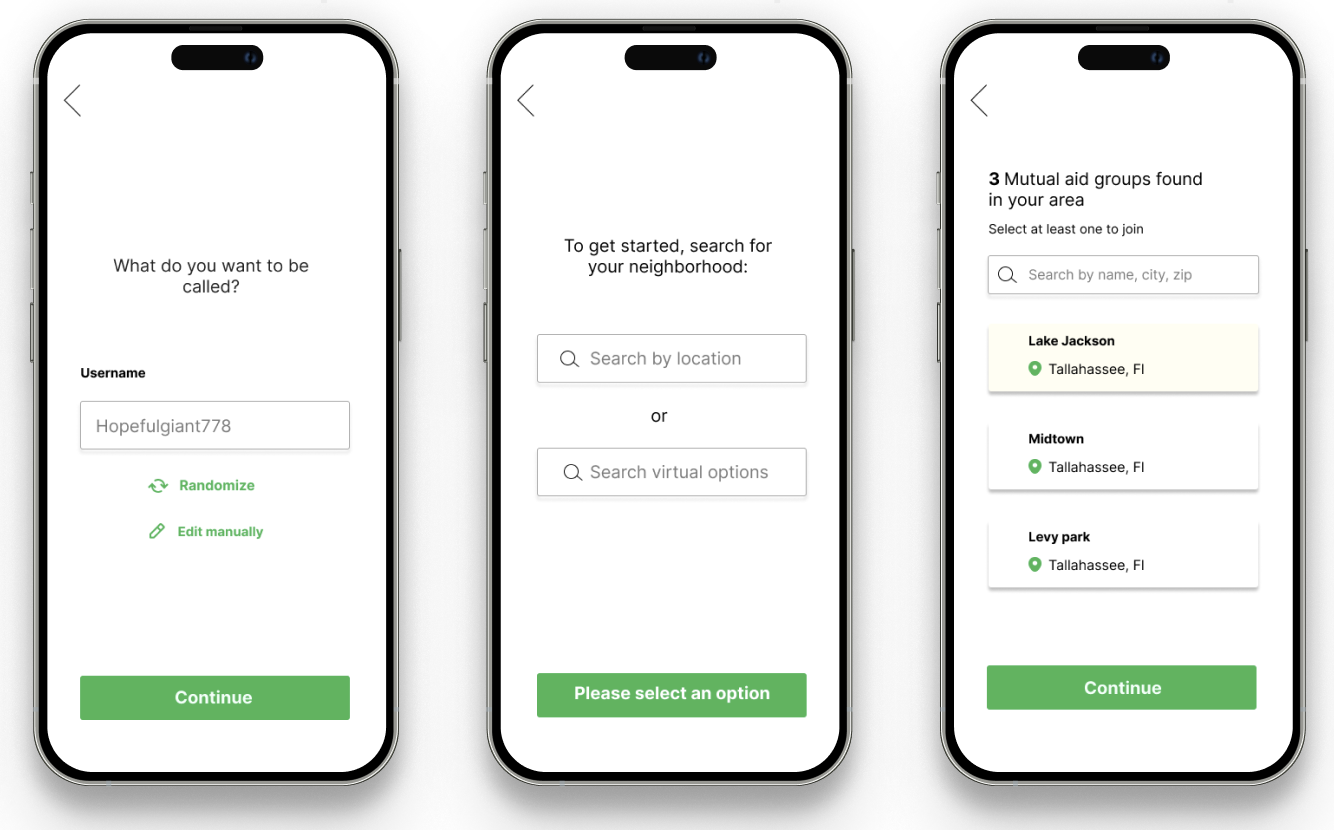
Allow users to use anonymous pseudonyms. Don’t require any data beyond email or phone.
Volunteer burnout is the #1 struggle for mutual aid organizations
Allow users to switch between volunteer and user easily, so they aren’t trapped into a specific role.
I developed four distinct personas to expand upon the needs, desires, and pain points of potential help seekers and volunteers

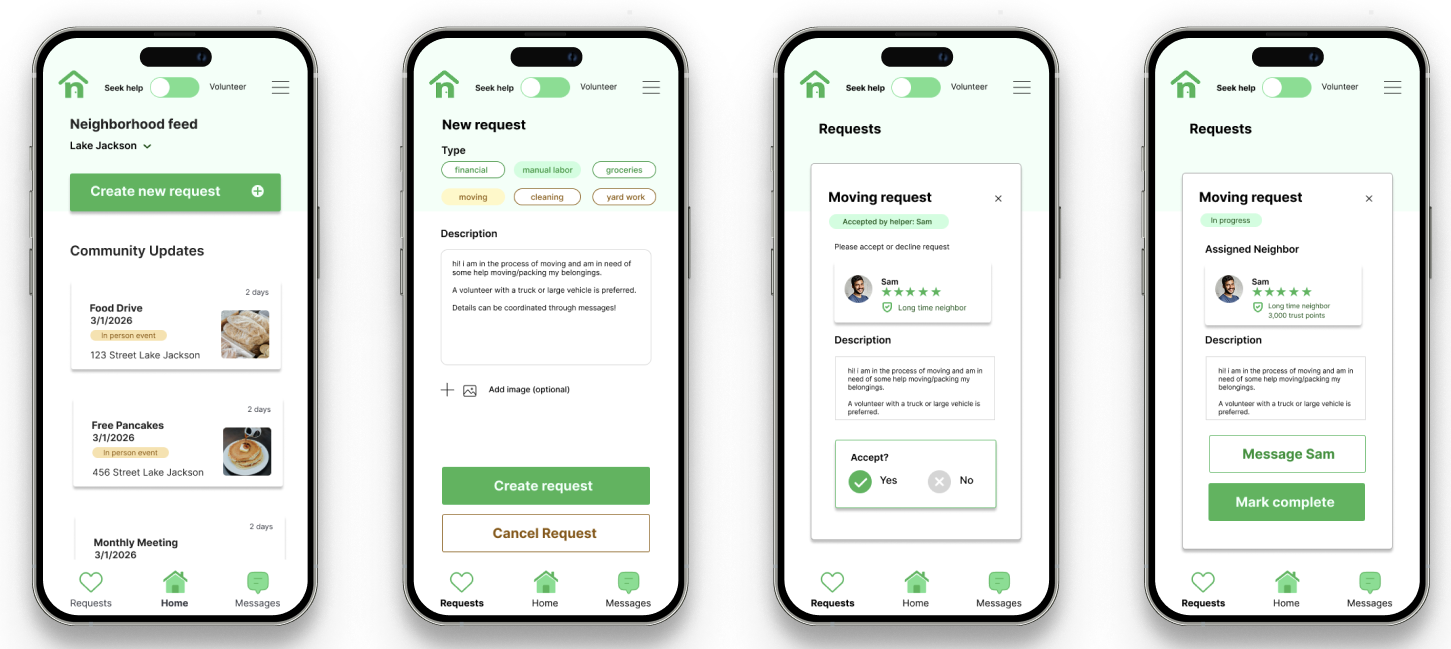
To support Maria’s busy schedule and low energy pain point, I implemented quick-tap categories (Groceries, Manual Labor) that auto-fill requests, reducing the time and cognitive effort required to ask for help.
Feature Idea:

To resolve Ari’s fear of embarrassment and desire for dignity,"I designed an onboarding flow that generates randomized usernames, allowing her to seek financial or grocery aid without fear of social stigma.
Feature idea:

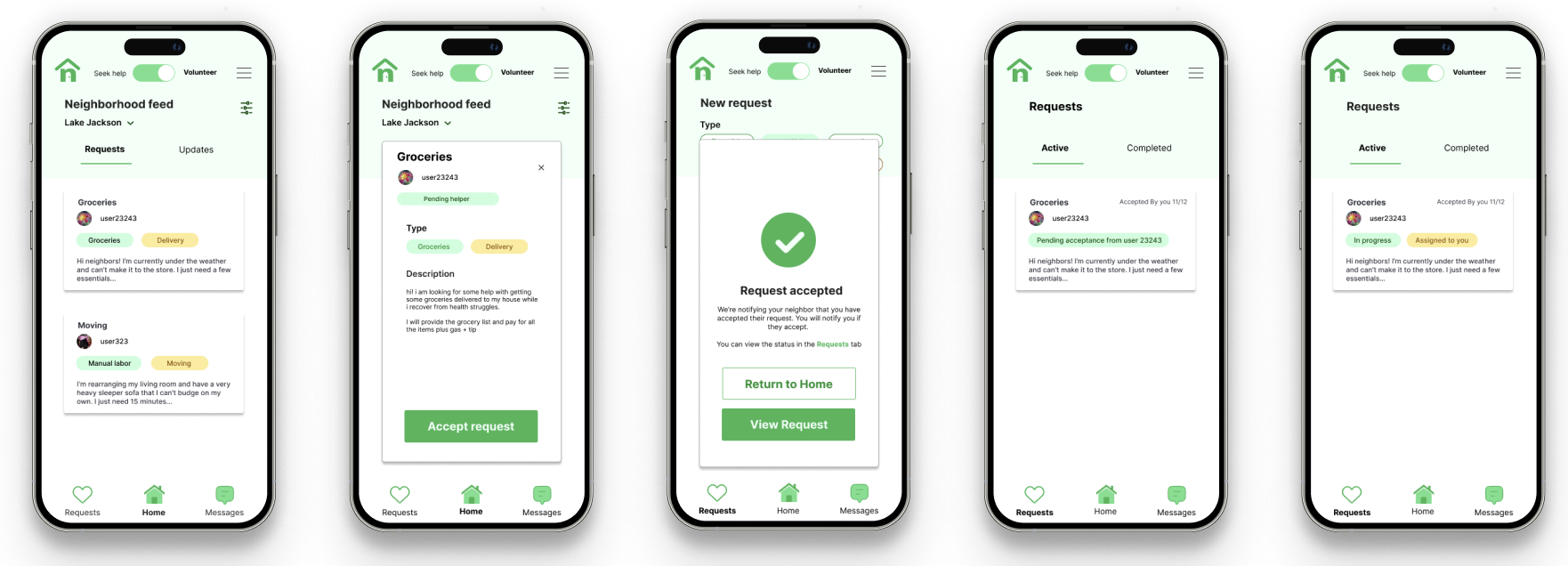
To prevent Jordan's burnout, I created a prominent header toggle that allows him to switch instantly between "Volunteer" and "Seek Help" modes, signaling that it is okay to be on either side of the community.

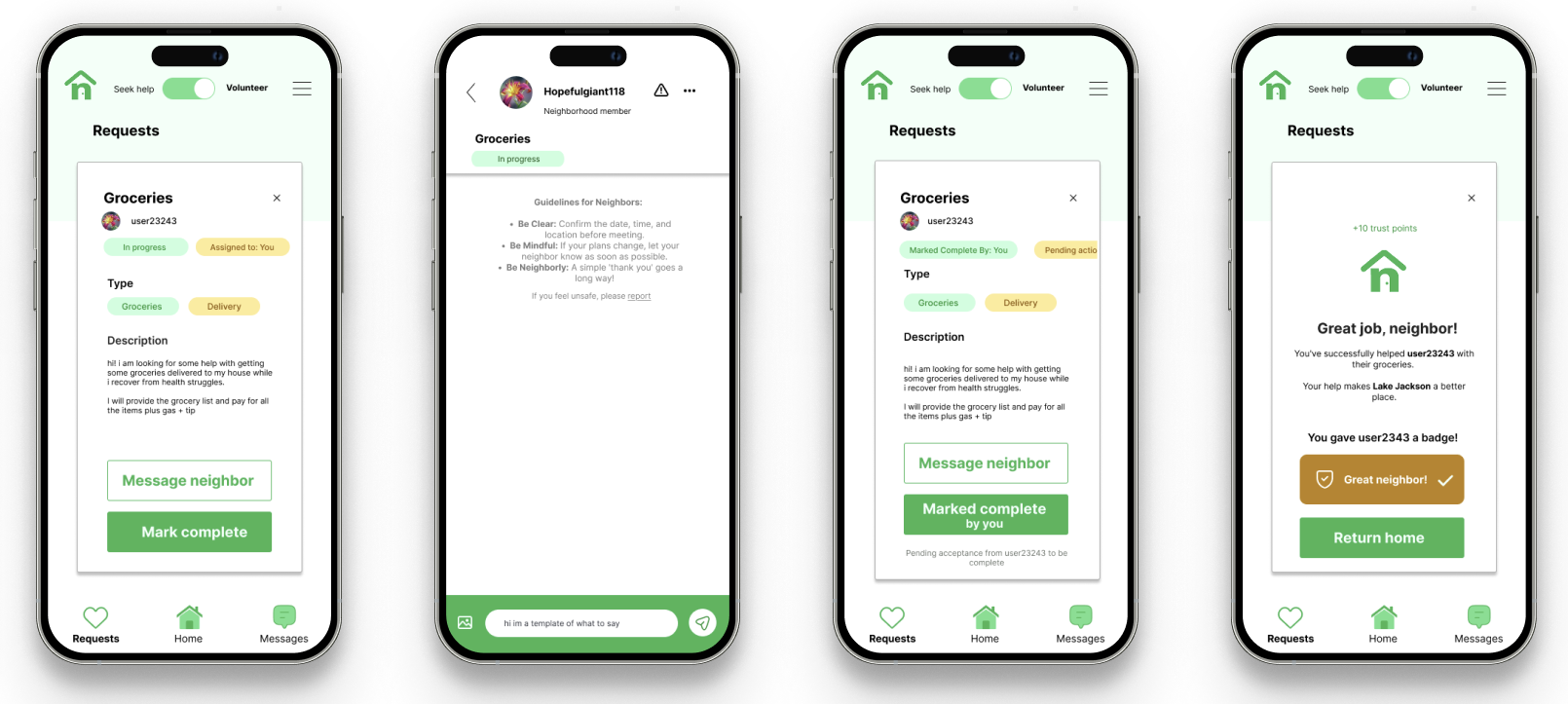
To ease Rosa’s uneasiness trusting strangers,I implemented a peer-to-peer Badge system (e.g., "Great Neighbor!") that serves as a visual trust signal from other community members.
Feature idea:
I mapped the parallel journeys of the help seeker and the volunteer to ensure that at every point of vulnerability , the app provides a safety net to put the user at ease.
For the seeker, this meant emphasizing privacy during onboarding; for the volunteer, it meant providing clear role-based expectations.


Brainstorming early concepts for the design
I began by exploring 5 different entry points for the user.
I ultimately decided to move forward with a hybrid of Option 2 and 5, with Option 2 as the landing screen and Option 5 as the dashboard displayed once the mode is selected.
This provided the clearest path for the two distinct user journeys (help seeker and volunteer).

I continued the early design process by mapping out a two-path information architecture.
My goal was to ensure that while the help seeker and volunteer have different primary tasks, the transition between these roles remains frictionless.
This branchnig logic allowed me to maintain a consistent navigation system while tailoring the feed to the user's mode.

I continued iterating on designs for more screens.
I continued this process until I developed wireframes for my planned user flows.

Observing where participants paused or felt uncertain
I protyped my wireframes in Figma to create user flows designed for 5 tasks
Tasks:
1. You’ve just heard about this app and want to see what's happening in your neighborhood. Set up an account without using your real name.
2. You need help moving a heavy sofa this weekend. Create a request for help in your local group.
3. Switch to 'Volunteer' mode and find a neighbor who needs help with groceries. Reach out to let them know you can do it.
4. You are currently looking at requests in 'Lake Jackson,' but you want to see if anyone needs help near your workplace in 'South side.' Change your group.
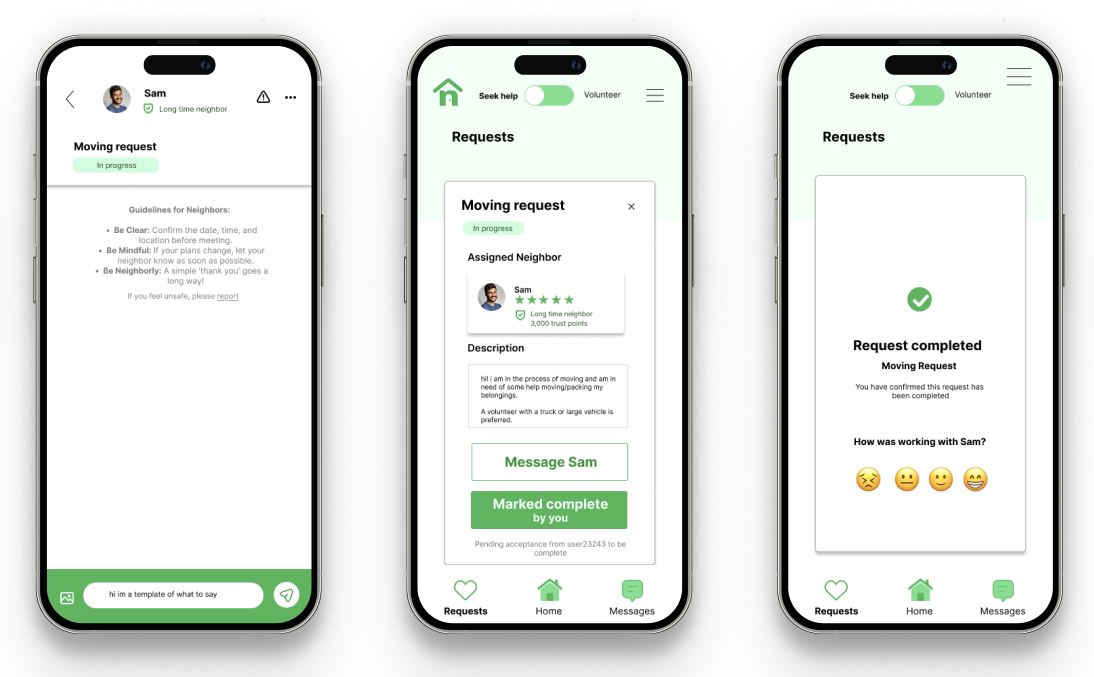
5. A neighbor just helped you with a task. Mark it as finished and let the community know they were helpful.
To test my high-fidelity designs, I conducted a usability study with six participants.
By tracking their click paths and recording specific quotes, I was able to identify points of friction.
Participants then participated in a System Usability Scale questionnaire to provide feedback on the design.
Lack of confirmation
Users felt lost after hitting submit.
Confusing 'Assigned' state
Volunteers didn't know the next step.
Homepage clutter
Users felt overwhelmed by widgets.
Misplaced arrow
Users hesitated when switching between neighborhoods.
Navigation bar
Users questioned which page of the app they were currently viewing.
Lack of written reviews
Users desired the ability to leave a written review, opposed to just a rating.
Iterating on the wireframes, incorporating insights from the usability study
.png)
.png)
.png)
.png)
Developing a lightweight design system for Neighborly
I chose the Inter typeface for its high legibility on mobile screens and established a color palette rooted in a "Community Green" to evoke feelings of growth and trust.